
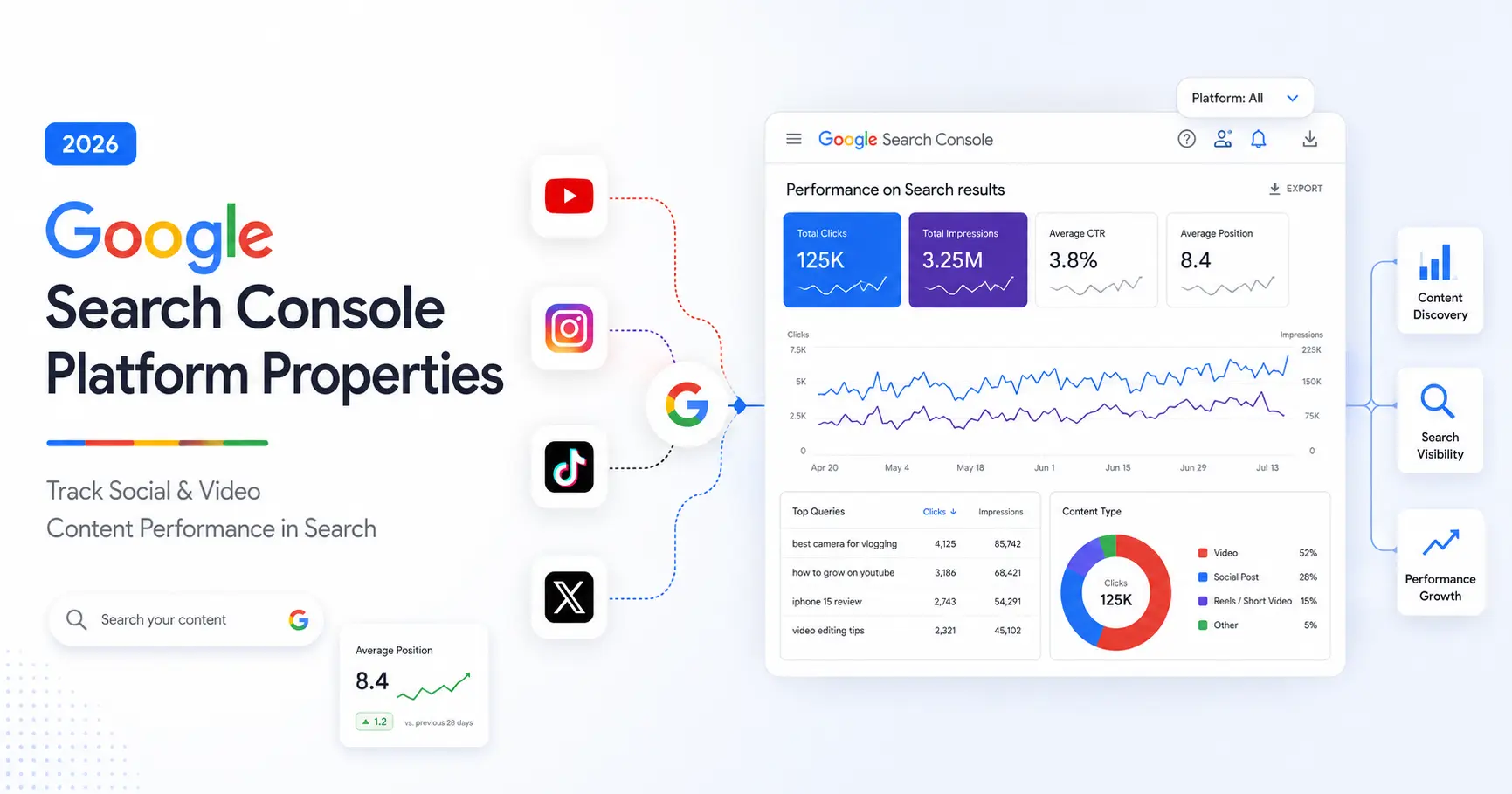
Google Search Console has expanded beyond traditional websites with a new feature called Platform Properties, giving creators, publishers, and businesses a way to understand how their social media and video content performs in Google Search and Google Discover.
Announced on July 7, 2026, Platform Properties introduce a new type of Search Console property designed for creators who publish content on platforms like YouTube, Instagram, TikTok, and X.
The biggest change?
You no longer need to own a website or verify a domain to understand how your content is discovered through Google Search.
Instead of only analysing webpages, creators can now measure how their social and video content appears in search results and which search queries bring users to their content.
What Are Google Search Console Platform Properties?
Google Search Console Platform Properties are a new property type that allows creators to connect supported social and video platforms and view Google Search performance data.
Previously, Search Console was mainly used by website owners to analyse:
- Search rankings
- Website clicks
- Search impressions
- Keywords
- Technical SEO issues
With Platform Properties, Google is extending these insights to content published outside traditional websites.
Currently, Platform Properties support:
- TikTok
- X (formerly Twitter)
- YouTube
Why Did Google Introduce Platform Properties?
The way people discover information has changed.
Search behaviour is no longer limited to websites. Users increasingly find answers through:
- YouTube tutorials
- Instagram Reels
- TikTok videos
- Social discussions
For example, someone searching:
“Beginner SEO tutorial”
may find:
- A YouTube video explaining SEO basics
- An Instagram Reel about SEO tips
- A TikTok tutorial
Previously, creators could see engagement inside each platform’s analytics tools, but they had limited visibility into how Google Search contributed to that traffic.
Platform Properties solve this by showing:
- Which searches lead users to your content
- How often your content appears in Google Search
- Which posts attract search traffic
Do You Need a Website to Use Platform Properties?
No.
This is one of the biggest differences between traditional Search Console properties and Platform Properties.
Website properties usually require ownership verification of a domain or URL.
Platform Properties allow creators to connect supported social and video accounts directly.
This means:
- YouTube creators without websites can use Search Console
- Social media creators can analyse Google Search visibility
- Publishers can understand how their content performs outside their own websites
Supported Platforms
Currently, creators can connect:
YouTube
Understand how videos are discovered through Google Search.
Analyse how Instagram content receives visibility from Google Search.
TikTok
Track search discovery for TikTok content.
X (formerly Twitter)
Understand how posts appear and perform in Google Search.
Google may expand Platform Property support to additional platforms in the future.
How to Add a Platform Property in Google Search Console
Setting up a Platform Property is straightforward.
Step 1: Open Google Search Console
Sign in to Google Search Console using your Google account.
Step 2: Select Add Property
Open the property selector and choose:
Add Property
Step 3: Choose a Supported Platform
Select the platform you want to connect:
- TikTok
- X
- YouTube
Step 4: Complete Verification
Follow the verification instructions and securely authorize Google to connect with your account.
Step 5: Access Search Performance Reports
After verification, you can view available reports about how your content performs through Google Search.
What Data Can You See in Platform Properties?
Platform Properties provide several reports to help creators understand content discovery.
1. Performance Report
The Performance Report shows how users discover your content through Google Search.
You can view:
- Total clicks
- Total impressions
- Click-through rate (CTR)
- Average position
- Search queries that lead users to your content
- Which posts and queries are driving the most traffic
Example:
You publish a YouTube video:
“SEO Tutorial for Beginners”
Google Search Console may show that users found your video after searching:
- beginner SEO guide
- how to learn SEO
- SEO basics
This information helps you create future content based on real search behaviour.
2. Insights Report
The Insights Report provides a simplified overview of your content performance.
It helps you understand:
- Recent traffic trends
- Top-performing posts
- How people discover your content through Google
Instead of analysing large amounts of data, creators can quickly identify which content performs well in Google Search.
3. Achievements
Platform Properties include achievements that highlight important Google Search performance milestones.
For example:
Your content may receive an achievement after reaching a new threshold of Google Search clicks during the last 28 days.
Important:
These achievements are based on Google Search performance, not total views or engagement inside platforms.
A YouTube video receiving 50,000 views does not automatically count.
Only clicks from Google Search are measured.
Platform Properties vs Native Platform Analytics
Platform Properties do not replace the analytics tools provided by social and video platforms.
They answer a different question:
“How did people discover my content through Google Search?”
Native analytics answer:
“How did my content perform inside the platform?”
For example:
YouTube Analytics provides:
- Video views
- Watch time
- Audience retention
- Subscribers
- Engagement
Instagram Insights provides:
- Reach
- Reel plays
- Saves
- Shares
- Followers
TikTok Analytics provides:
- Views
- Watch time
- Audience information
- Engagement
Both tools work together.
Platform Properties vs Search Profiles
Search Profiles and Platform Properties are different Google features.
What Are Search Profiles?
Search Profiles are public-facing pages designed to help people discover a creator’s content across Google Search.
They focus on visibility and content discovery.
What Are Platform Properties?
Platform Properties are private analytics spaces inside Google Search Console.
They help creators understand:
- Search visibility
- Search queries
- Google Search clicks
- Content performance
The difference is simple:
Search Profiles help audiences find creators.
Platform Properties help creators understand how audiences find their content.
Why Platform Properties Matter for SEO
This update shows that SEO is expanding beyond traditional webpages.
Search visibility now includes:
- Websites
- Videos
- Social content
- Creator platforms
For SEO professionals and marketers, Platform Properties provide new opportunities to:
- Discover search demand for social content
- Identify topics that attract Google traffic
- Create content based on real search behaviour
- Understand how audiences discover content across platforms
The future of SEO is not only about ranking websites.
It is about making valuable content discoverable wherever people search.
Why Is My Platform Property Data Empty?
If you connect a Platform Property and see limited data, there may be several reasons.
The Feature Is Still Rolling Out
Google is releasing Platform Properties gradually, so availability may differ between accounts.
Your Content Has Limited Google Search Visibility
Platform Properties only show:
- Google Search traffic
- Google Discover performance
They do not show:
- Platform views
- Likes
- Comments
- Shares
New Data May Take Time
Recently connected properties may not immediately display complete data.
Account Verification May Need Renewal
If your platform connection expires, you may need to verify the account again.
Frequently Asked Questions
Is Google Search Console Platform Properties free?
Yes.
Platform Properties are available as part of Google Search Console at no cost.
Do I need a website for Platform Properties?
No.
Creators can connect supported social and video platforms without owning a website or domain.
Which platforms work with Platform Properties?
Currently supported platforms include:
- TikTok
- X
- YouTube
Does Platform Properties show Instagram or YouTube views?
No.
It only shows how content performs when discovered through Google Search and Google Discover.
For platform-specific engagement data, use native analytics tools.
When will Platform Properties be available?
Google is rolling out the feature gradually.
If you do not see the option yet, your account may receive access during the wider rollout.
Final Thoughts
Google Search Console Platform Properties represent an important change in how creators measure search visibility.
As audiences continue moving between websites, videos, and social platforms, understanding how content is discovered through search will become increasingly valuable.
For creators, marketers, and SEO professionals, this update provides a clearer picture of the complete content discovery journey—from search query to content engagement.
SEO is no longer only about ranking webpages.
It is about helping valuable content appear wherever people search.