
Introduction
When websites grow, managing large amounts of content becomes a major challenge.
An ecommerce website may have thousands of products. A blog may contain hundreds of articles. A marketplace may have millions of listings.
Displaying all this content on one page creates problems:
- Slow loading times
- Poor user experience
- Large HTML documents
- Increased server requests
- Poor Core Web Vitals performance
To solve this problem, websites use pagination.
Pagination divides large collections of content into smaller sections, allowing users and search engines to navigate information more efficiently.
However, pagination is not only a design decision.
The type of pagination you choose can affect:
- Search engine crawling
- Content discovery
- Indexing
- Website architecture
- User experience
- Development complexity
Today, websites commonly use several pagination approaches:
- Traditional numbered pagination
- Load More buttons
- Hybrid pagination
- Infinite scrolling
Each method has advantages and disadvantages.
A design that creates a smooth user experience may create SEO problems if search engines cannot discover the underlying content.
This guide explains how each pagination method works, how Google processes paginated pages, and which approach is best from an SEO perspective.
1. What Is Pagination?
Pagination is the process of dividing a large collection of content into multiple pages instead of displaying everything at once.
For example, an online store with 1,000 products might display:
Page 1 → Products 1–24
Page 2 → Products 25–48
Page 3 → Products 49–72
Instead of loading all products on one page, the website separates them into smaller groups.
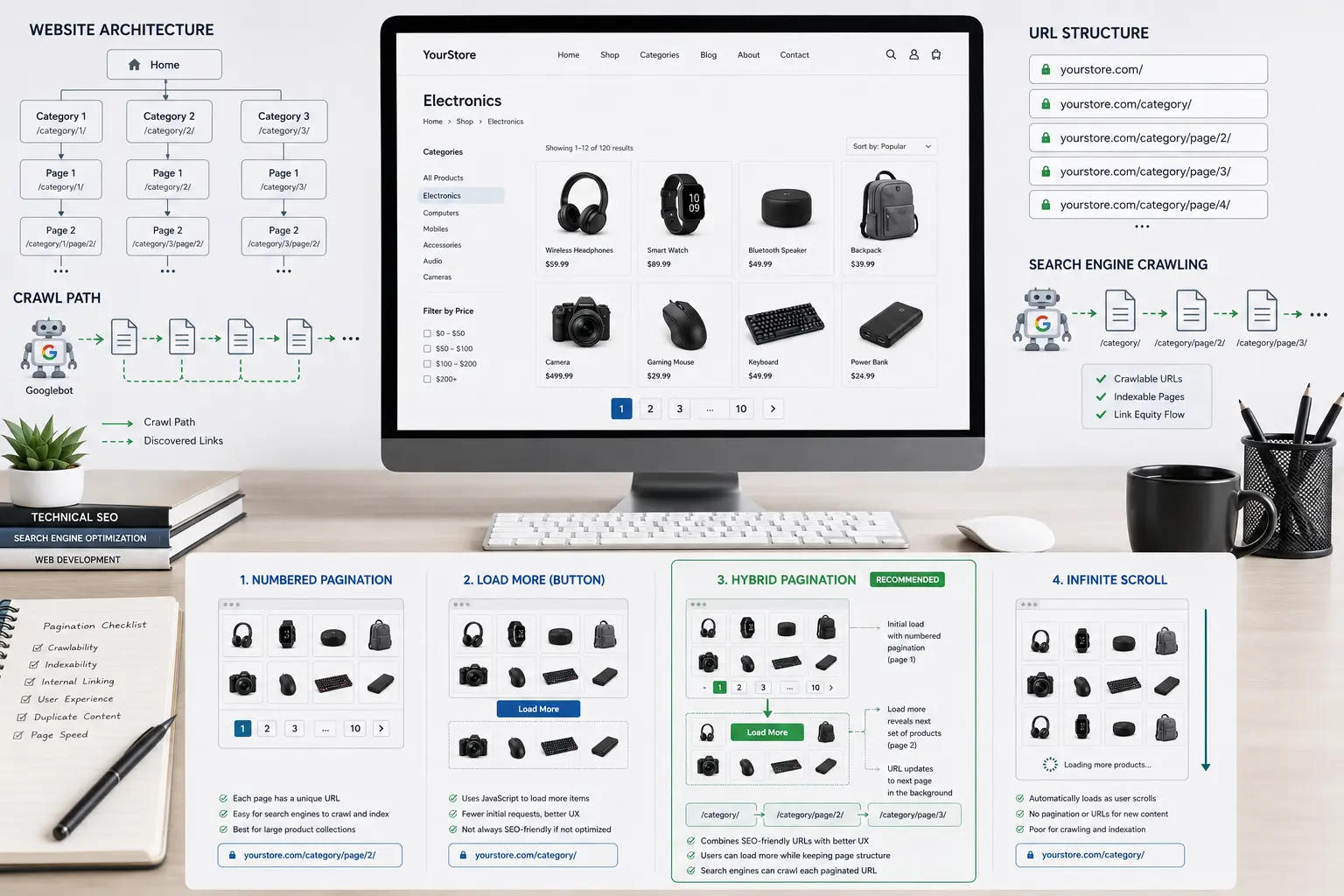
A typical pagination structure looks like:
example.com/shoes/
example.com/shoes/page/2/
example.com/shoes/page/3/
Pagination is commonly used for:
- Ecommerce category pages
- Blog archives
- Search result pages
- Forums
- Documentation websites
- News websites
- Image galleries
Why Websites Need Pagination
1. Better Website Performance
Loading thousands of items on one page increases:
- HTML size
- Database queries
- Browser processing
- JavaScript execution
- Memory usage
For example, a product category containing 5,000 products would create an extremely heavy page if everything loaded immediately.
Pagination allows websites to load only the necessary amount of content.
2. Better User Experience
Users usually do not want to process hundreds of products at once.
Pagination provides structure:
Products 1–24
Next page
Products 25–48
This makes browsing easier.
3. Better Website Organisation
Pagination creates a clear content hierarchy.
Example:
Homepage
↓
Category Page
↓
Category Page 2
↓
Category Page 3
↓
Products
This helps both users and search engines understand the website structure.
2. Why Pagination Matters for SEO
Pagination affects SEO because search engines need to discover and understand large websites efficiently.
The main SEO considerations are:
Crawling
Search engines need to find all important URLs.
Example:
/category/
/category/page/2/
/category/page/3/
If these URLs are accessible through normal links, search engines can discover them.
Indexing
After discovering pages, search engines decide whether those pages should appear in search results.
Poor pagination implementation can hide valuable content.
Example:
A website has:
Product 1–24
visible in HTML.
Additional products appear only after clicking a JavaScript button.
If search engines cannot discover those additional pages, those products may receive less visibility.
Internal Linking
Pagination creates links between related pages.
Example:
Category
↓
Page 2
↓
Page 3
These links help distribute internal authority throughout the website.
3. Types of Website Pagination
There are four major pagination methods:
- Traditional numbered pagination
- Load More pagination
- Hybrid pagination
- Infinite scroll
Each works differently.
3.1 Traditional Numbered Pagination
Traditional pagination is the most common and established method.
Users navigate using numbered links:
Previous
1 2 3 4 5
Next
Each page has its own URL:
example.com/shop/
example.com/shop/page/2/
example.com/shop/page/3/
When users click page 2:
User clicks Page 2
↓
Browser requests /shop/page/2/
↓
Server generates page
↓
Browser loads new page
No JavaScript is required.
Why Traditional Pagination Is Strong for SEO
The biggest advantage is simple:
Every page exists as a crawlable URL.
Search engines can discover:
Page 1
↓
Page 2
↓
Page 3
using standard HTML links.
Example:
<a href=”/shop/page/2/”>
Next Page
</a>
This is exactly the type of structure search engines understand easily.
Advantages of Traditional Pagination
Simple Implementation
Most CMS platforms already support it.
Examples:
- WordPress
- WooCommerce
- Shopify
- Magento
Low Technical Risk
It does not depend heavily on JavaScript.
Theme changes or plugin updates are less likely to break it.
Strong SEO Foundation
It provides:
- Crawlable URLs
- Clear architecture
- Predictable navigation
Disadvantages of Traditional Pagination
The main disadvantage is user experience.
Every click requires a page load.
Example:
Page 1
↓
Click page 2
↓
Wait
↓
Page 2 loads
For users browsing many products, this may feel slower compared with modern interfaces.
However, this is mainly a UX consideration, not an SEO problem.
3.2 Load More Pagination
Load More pagination replaces numbered links with a button that allows users to request additional content.
Example:
Product 1
Product 2
…
Product 24
[ Load More ]
When the user clicks the button, more products appear below the existing products.
Example:
Before clicking:
Products 1–24
After clicking:
Products 1–48
The page does not refresh.
How Load More Pagination Works
A typical Load More implementation uses JavaScript to request additional content from the server.
The process looks like this:
User clicks Load More
↓
JavaScript runs
↓
Request sent to server
↓
Server returns additional products
↓
JavaScript inserts products into the page
Technologies commonly used:
- AJAX
- Fetch API
- REST API
Why Load More Is Popular
Many websites choose Load More because it creates a smoother browsing experience.
Advantages:
No Full Page Reload
Users remain on the same page.
Instead of:
Page 1
↓
Reload
↓
Page 2
the experience becomes:
Products 1–24
↓
Click
↓
Products 1–48
Better Mobile Experience
On mobile devices, repeatedly clicking small page numbers can feel inconvenient.
A large Load More button can reduce friction.
More Continuous Browsing
Load More works well for websites where users are discovering content rather than searching for something specific.
Examples:
- Fashion products
- Images
- Articles
- Inspiration websites
The SEO Problem With Basic Load More
The main SEO issue occurs when additional content exists only after JavaScript interaction.
Example:
Initial HTML:
Products 1–24
<button>
Load More
</button>
After clicking:
Products 25–48 appear
But there is no URL:
/shop/page/2/
The problem is:
Search engines see:
/shop/
but they may not have a clear path to:
/shop/page/2/
The content exists for users but may not exist as a discoverable webpage.
Is Load More Always Bad for SEO?
No.
The problem is not the button itself.
The problem is whether search engines can access the underlying pages.
A better implementation would maintain:
/shop/
/shop/page/2/
/shop/page/3/
while still providing a Load More experience for users.
This leads to hybrid pagination.
3.3 Hybrid Pagination
Hybrid pagination combines traditional pagination with a modern Load More experience.
The idea is:
Give users a seamless browsing experience while keeping crawlable URLs for search engines.
A hybrid implementation looks like this:
User interface:
Products
Product 1
Product 2
…
Product 24
[ Load More ]
Behind the scenes:
/shop/
/shop/page/2/
/shop/page/3/
The pages still exist.
The difference is that JavaScript loads them dynamically instead of forcing a full page refresh.
How Hybrid Pagination Works
The process:
User clicks Load More
↓
JavaScript requests page 2
↓
Server returns page 2 content
↓
Products are added to current page
↓
Browser URL may update
The user sees:
One continuous page
But search engines can still access:
/shop/page/2/
Why Hybrid Pagination Is Considered SEO-Friendly
A properly implemented hybrid system provides:
Crawlable URLs
Example:
/category/
/category/page/2/
/category/page/3/
Search engines can crawl these pages normally.
Better User Experience
Users do not need to wait for full page reloads.
Flexible Navigation
Advanced implementations can use browser history.
For example:
When users load page 2:
Before:
example.com/shop/
After:
example.com/shop/page/2/
using the History API.
The Important Requirement of Hybrid Pagination
The most important rule:
Google should not need to click the Load More button to discover important content.
A good hybrid implementation has:
<a href=”/shop/page/2/”>
Page 2
</a>
available somewhere in the page structure.
JavaScript enhances the experience.
It should not replace discoverability.
Why Hybrid Pagination Is More Complex
Although hybrid pagination can provide excellent results, it introduces additional development requirements.
Developers must handle:
1. Browser History
Example:
User loads:
Page 1
then:
Page 2
then clicks back.
Should the browser restore:
- The previous URL?
- The previous scroll position?
- The previously loaded products?
This requires additional logic.
2. Scroll Restoration
Example:
A user browses 100 products.
Clicks a product.
Returns back.
Should they return to:
Top of category page
or:
The exact product position?
3. Error Handling
What happens if:
- The request fails?
- Internet disconnects?
- The server returns an error?
Traditional pagination already handles these cases naturally.
4. Future Compatibility
Custom JavaScript may break after:
- Theme updates
- WooCommerce updates
- Plugin changes
The risk is not because AJAX or Fetch API is bad.
The risk comes from custom code depending on website structure.
3.4 Infinite Scroll
Infinite scroll removes visible pagination controls completely.
Instead of clicking anything, new content loads automatically when users reach the bottom.
Example:
Product 1
Product 2
Product 3
↓
Scroll
↓
Product 50 appears
↓
Scroll
↓
Product 100 appears
Why Websites Use Infinite Scroll
Infinite scrolling is designed for continuous content discovery.
It works well for:
- Social media feeds
- Image platforms
- News feeds
Examples:
- Users are casually browsing
- There is no clear stopping point
- The goal is engagement
Why Infinite Scroll Creates SEO Challenges
The main problem is discovery.
Humans interact differently from search engines.
A user does:
Open page
↓
Scroll
↓
More content loads
↓
Scroll again
But search engines primarily discover content through:
URLs
↓
Links
↓
Crawling
Example of an SEO Problem
A website has:
example.com/products/
Initial HTML:
Products 1–24
After scrolling:
Products 25–48
After more scrolling:
Products 49–72
But there are no URLs:
/products/page/2/
/products/page/3/
The additional products are hidden behind interaction.
Can Infinite Scroll Be SEO-Friendly?
Yes, but only with proper implementation.
A good infinite scroll system should still provide:
/products/
/products/page/2/
/products/page/3/
The infinite scroll becomes a user interface layer.
The underlying architecture remains traditional pagination.
At that point, it becomes very similar to hybrid pagination.
Pagination Comparison Table
Pagination Type | Crawlable URLs | JavaScript Required | SEO Risk | Development Complexity |
Traditional Pagination | Yes | No | Low | Low |
Load More | Sometimes | Yes | Medium-High | Medium |
Hybrid Pagination | Yes (if implemented correctly) | Yes | Low-Medium | High |
Infinite Scroll | Usually No | Yes | High | High |
4. How Google Crawls Paginated Content
To understand pagination SEO, we need to understand how Google processes websites.
Google generally works through three stages:
- Crawling
- Rendering
- Indexing
Crawling
During crawling, Google discovers URLs.
Example:
Google finds:
<a href=”/products/page/2/”>
Next
</a>
It discovers:
/products/page/2/
and adds it to its crawl queue.
This is why traditional pagination works so reliably.
Rendering
Rendering is when Google processes JavaScript and creates the final version of the page.
Example:
A website loads products through JavaScript:
HTML
↓
JavaScript executes
↓
Products appear
Google can process JavaScript.
However, rendering requires additional resources compared with simply reading HTML links.
Important SEO Principle
JavaScript is not automatically bad for SEO.
The problem is:
Important content should not depend only on user interaction or complex JavaScript execution.
A JavaScript-enhanced website can perform very well if crawlable URLs exist.
JavaScript-Friendly vs JavaScript-Dependent Pagination
JavaScript-Friendly
Example:
HTML:
<a href=”/page/2/”>
Page 2
</a>
JavaScript:
Loads page 2 without refresh
Good.
JavaScript-Dependent
Example:
HTML:
<button>
Load More
</button>
JavaScript:
Creates everything
No URLs.
5. Does Pagination Affect Crawl Budget?
Crawl budget is one of the most misunderstood topics when discussing pagination.
Many people ask:
“Does hybrid pagination consume more crawl budget than traditional pagination?”
The answer depends on the implementation.
What Is Crawl Budget?
Crawl budget refers to the amount of resources search engines allocate to crawling a website within a specific period.
It is influenced by factors such as:
- Website size
- Server performance
- URL quality
- Crawl demand
- Website authority
- Content freshness
For small websites, crawl budget is rarely a serious concern.
For very large websites with:
- Millions of products
- Thousands of categories
- Large archives
crawl efficiency becomes much more important.
Traditional Pagination and Crawl Budget
Traditional pagination provides a clear structure.
Example:
/category/
↓
/category/page/2/
↓
/category/page/3/
Google can discover pages through HTML links.
The crawling process:
Read HTML
↓
Find links
↓
Add URLs to crawl queue
↓
Crawl pages
This is predictable and efficient.
Hybrid Pagination and Crawl Budget
A properly implemented hybrid pagination system can have the same crawl behaviour as traditional pagination.
Example:
Traditional:
/products/
/products/page/2/
/products/page/3/
Hybrid:
/products/
/products/page/2/
/products/page/3/
From Google’s perspective, the URLs are the same.
Therefore:
The crawl requirement is also the same.
The Load More button does not automatically increase crawl budget usage.
Where Hybrid Pagination Can Create Crawl Problems
The problem appears when developers create a JavaScript-dependent system.
Example:
HTML contains:
<button>
Load More
</button>
Additional content loads through:
fetch(‘/api/products?page=2’)
but there is no:
/products/page/2/
URL.
Now search engines have a harder path to discover content.
Potential issues:
- Additional rendering requirements
- Delayed discovery
- Missing indexed pages
- Difficult troubleshooting
The Real Crawl Budget Difference
The difference is not:
❌ Traditional pagination vs Hybrid pagination
The difference is:
✅ Static HTML discovery vs JavaScript-dependent discovery
A simple comparison:
Implementation | Crawl Efficiency |
Traditional pagination with HTML links | Excellent |
Hybrid with crawlable URLs | Excellent |
Hybrid without crawlable URLs | Risky |
Pure infinite scroll | Risky |
Does JavaScript Rendering Waste Crawl Budget?
JavaScript rendering does require additional processing.
However, this does not mean:
“JavaScript websites cannot rank.”
Many successful websites rely heavily on JavaScript.
The important question is:
“Can search engines access important content without unnecessary complexity?”
6. JavaScript Pagination: AJAX vs Fetch API vs REST API
When developers create dynamic pagination, they need a way to request additional content.
The most common methods are:
- AJAX
- Fetch API
- REST API
These technologies are not pagination methods.
They are communication methods.
The pagination method is:
Load additional content dynamically.
The technology decides:
How does the browser request that content?
AJAX Pagination
AJAX stands for:
Asynchronous JavaScript and XML
Although the name includes XML, modern AJAX commonly uses JSON.
The flow:
User clicks Load More
↓
JavaScript sends AJAX request
↓
Server processes request
↓
Response returned
↓
Content displayed
In WordPress, AJAX commonly uses:
admin-ajax.php
Advantages of AJAX
- Widely supported
- Common in WordPress plugins
- Familiar to many developers
Disadvantages
Custom AJAX implementations can create maintenance problems.
Examples:
- Plugin conflicts
- Theme changes
- JavaScript errors
- Incorrect selectors
Fetch API Pagination
Fetch API is a modern JavaScript method for making network requests.
Example:
fetch(‘/products/page/2/’)
The browser requests additional content without refreshing the page.
Advantages
- Modern standard
- Cleaner than older AJAX approaches
- No jQuery dependency
Important SEO Point
Fetch API itself does not improve or damage SEO.
SEO depends on:
- Are URLs accessible?
- Can search engines discover pages?
- Is content available?
Not on whether the developer used AJAX or Fetch.
REST API Pagination
REST API provides structured data endpoints.
Example:
/wp-json/products?page=2
The server may return:
id=”8d5h1a”
{
“product”: “Blue Shirt”,
“price”: “$25”
}
JavaScript then creates the product display.
Where REST API Is Common
- Headless WordPress websites
- React applications
- Mobile applications
- Large web platforms
Advantages
- Flexible
- Structured data
- Good for complex applications
Disadvantages
More development responsibility:
- API maintenance
- Security
- Frontend rendering
- Error handling
Which Technology Is Best for WordPress Hybrid Pagination?
For a normal WordPress or WooCommerce website, a practical approach is often:
Existing WordPress pagination URLs
+
JavaScript enhancement
+
Fetch API or AJAX
The important part is not the technology.
The important part is keeping the SEO foundation.
7. WordPress and WooCommerce Pagination
WordPress already provides SEO-friendly pagination.
Examples:
Blog:
/blog/
/blog/page/2/
WooCommerce:
/product-category/shoes/
/product-category/shoes/page/2/
These URLs are naturally crawlable.
Traditional Pagination in WordPress
WordPress themes commonly use:
id=”j5z8c0″
the_posts_pagination();
or:
id=”c8x9v4″
paginate_links();
This generates:
id=”m0s1a7″
<a href=”/page/2/”>
2
</a>
Implementing Load More in WooCommerce
A typical WooCommerce Load More system needs:
- A button
Example:
id=”0y5p9h”
<button>
Load More Products
</button>
- JavaScript event handling
Example:
id=”6x8m4q”
button.onclick = function(){
requestNextProducts();
}
- Server response
The server returns:
- Product HTML
- Product data
- Next page number
- JavaScript inserts products.
Hybrid Pagination in WordPress
A good WooCommerce hybrid setup would look like:
Initial URL:
/shop/
Available pagination:
/shop/page/2/
/shop/page/3/
User experience:
Click Load More
↓
Products appear instantly
↓
URL updates
Search engines:
Can still access /shop/page/2/
Maintenance Considerations in WordPress
This is where traditional pagination has a major advantage.
A custom hybrid system depends on many moving parts.
1. Theme Updates
A theme update may change:
Before:
<div class=”products”>
After:
<ul class=”woocommerce-products”>
JavaScript searching for the old structure may fail.
2. Plugin Updates
Possible conflicts:
- WooCommerce updates
- Filtering plugins
- Cache plugins
- Security plugins
3. Cache and CDN Issues
Dynamic requests may be affected by:
- Browser cache
- Server cache
- CDN rules
4. Tracking Issues
With traditional pagination:
Google Analytics naturally sees:
Page 1
Page 2
Page 3
With hybrid:
Developers may need custom tracking for:
- Virtual pageviews
- Product impressions
- User interactions
8. Common Pagination SEO Mistakes
Mistake 1: Hiding Everything Behind a Button
Example:
Only:
/shop/
+
Load More button
No page URLs.
Risk:
Search engines may not discover deeper content.
Mistake 2: Blocking Pagination URLs
Example:
Blocking:
/shop/page/2/
through robots.txt.
This prevents crawling.
Mistake 3: Incorrect Canonical Tags
A common mistake:
Page 2:
/shop/page/2/
Canonical:
/shop/
This tells search engines:
“Page 2 is not the main version.”
But page 2 contains different products.
Generally, paginated pages should have self-referencing canonicals.
Mistake 4: Creating Too Many URL Variations
Example:
/shop/page/2/
/shop?page=2
/shop?offset=24
Multiple URLs can waste crawling resources.
Mistake 5: Ignoring Mobile Experience
The correct pagination method should consider:
- Mobile users
- Product discovery
- Conversion rates
SEO should not be considered separately from usability.
9. Which Pagination Method Is Best for SEO?
There is no single pagination method that is perfect for every website.
The best choice depends on:
- Website type
- Number of pages
- Content structure
- Development resources
- Maintenance requirements
- User behaviour
However, if we consider SEO reliability, crawlability, development simplicity, and long-term stability, some clear patterns appear.
Traditional Numbered Pagination: Best SEO Foundation
SEO Rating: ★★★★★
Traditional pagination remains the safest choice for most websites.
Why?
Because it provides:
Crawlable URLs
Clear website structure
Simple implementation
Low maintenance risk
Easy debugging
Example:
/category/
/category/page/2/
/category/page/3/
Search engines understand this structure immediately.
Best For:
Blogs
Example:
A website with:
- Hundreds of articles
- Topic archives
- Author pages
Traditional pagination works extremely well.
B2B Websites
Example:
A supplier website with:
- Product catalogues
- Technical specifications
- Product comparisons
Users often need predictable navigation.
They may want to:
- Return to a specific page
- Bookmark a URL
- Compare items
Large Product Catalogues
For ecommerce websites with thousands of products, traditional pagination provides:
- Better crawl control
- Clear category structure
- Easier maintenance
Hybrid Pagination: Best Balance Between SEO and UX
SEO Rating: ★★★★★ (when implemented correctly)
Hybrid pagination can achieve the same SEO performance as traditional pagination.
The difference is user experience.
Example:
Traditional:
Click Page 2
↓
New page loads
Hybrid:
Click Load More
↓
Products appear instantly
Best For:
Ecommerce Discovery
Example:
Fashion stores.
Users may want to browse many products quickly.
A smooth experience can encourage:
- More product views
- Longer sessions
- Higher engagement
Mobile-First Websites
On mobile devices:
- Small page numbers are harder to use
- Reloading pages feels slower
Hybrid can reduce friction.
But Use Hybrid Only When:
The business can support the extra complexity.
You need:
- Proper development
- Testing
- Maintenance
- Analytics tracking
A poorly implemented hybrid system can be worse than simple pagination.
Infinite Scroll: Use Carefully
SEO Rating: ★★☆☆☆
Infinite scroll is excellent for engagement but challenging for SEO.
It is mainly designed for:
- Continuous consumption
- Discovery
- Entertainment
Best For:
Platforms where users are not searching for specific items.
Examples:
- Social feeds
- Image discovery platforms
- Content streams
Avoid Infinite Scroll For:
Ecommerce Search
Users often need:
- Filtering
- Comparison
- Returning to previous results
B2B Websites
Users need structure, not endless browsing.
Final Recommendation Table
Website Type | Recommended Pagination |
SEO blog | Traditional pagination |
News website | Traditional or Hybrid |
WooCommerce store | Traditional or Hybrid |
Large ecommerce marketplace | Hybrid (if resources exist) |
B2B catalogue | Traditional pagination |
Documentation website | Traditional pagination |
Social media platform | Infinite scroll |
Image discovery platform | Infinite scroll |
10. Frequently Asked Questions About Pagination SEO
Does Google crawl pagination pages?
Yes.
Google can crawl paginated pages when they are accessible through normal links.
Example:
<a href=”/products/page/2/”>
Next Page
</a>
Google can discover and crawl:
/products/page/2/
Does Google click Load More buttons?
Generally, no.
Googlebot does not behave exactly like a human user.
It does not normally:
- Click buttons
- Scroll endlessly
- Explore interactive elements
Therefore, important content should not depend only on clicking Load More.
Is Load More pagination bad for SEO?
Not necessarily.
A Load More button is SEO-friendly when:
- Pagination URLs exist
- Content is accessible through those URLs
- Search engines can discover pages
It becomes risky when:
- Everything depends on JavaScript
- No URLs exist
- Content is hidden behind interaction
Is hybrid pagination better than traditional pagination for SEO?
No.
From a pure SEO perspective, hybrid pagination is not better.
A properly implemented hybrid system is usually:
Equal to traditional pagination.
The advantage of hybrid is mainly:
- Better user experience
- Smoother browsing
Not better rankings.
Does JavaScript hurt pagination SEO?
No.
JavaScript itself is not a problem.
The problem is:
- Hidden content
- Missing URLs
- Poor rendering
- Complex dependencies
A JavaScript-enhanced website can rank successfully.
Should paginated pages use rel="next" and rel="prev"?
Google no longer requires these signals for pagination understanding.
The important factors are:
- Internal links
- Crawlable URLs
- Proper architecture
- Unique content
Should page 2 canonicalize to page 1?
Generally, no.
Example:
Page 1:
Products 1-24
Page 2:
Products 25-48
They contain different content.
Usually, each page should reference itself as canonical.
Does pagination waste crawl budget?
Pagination itself does not automatically waste crawl budget.
Problems happen when websites create:
- Thousands of unnecessary URLs
- Duplicate pages
- Poor internal linking
- Infinite URL combinations
Is infinite scroll bad for SEO?
Infinite scroll is not automatically bad.
However, it requires careful implementation.
A good infinite scroll system still provides:
/page/2/
/page/3/
URLs behind the scenes.
Without this, search engines may not discover deeper content.
11. Final Thoughts
Pagination is not just a design decision.
It is an important part of website architecture.
The goal is not simply creating a modern browsing experience.
The goal is creating a system where:
- Users can easily navigate content
- Search engines can discover important pages
- Developers can maintain the system long-term
From an SEO perspective:
Traditional pagination remains the safest choice.
It provides:
- Maximum crawlability
- Minimum technical complexity
- Long-term reliability
Hybrid pagination is a strong option when:
- User experience improvements are important
- Development resources are available
- Crawlable URLs remain accessible
Infinite scroll should be used carefully because:
- It prioritizes engagement over discoverability
- It requires advanced SEO implementation
The most important principle is:
Search engines do not care whether your website looks modern. They care whether your important content is accessible, understandable, and discoverable.
A simple numbered pagination system with a strong URL structure can outperform a sophisticated JavaScript experience if the sophisticated system hides content from search engines.
For most WordPress and WooCommerce websites, the best approach is:
Start with traditional pagination. Move to hybrid pagination only when there is a proven user experience benefit that justifies the additional technical complexity.