
Introduction
Many website owners open Google Search Console, go to the Page Indexing report, and immediately become concerned when they see hundreds or thousands of pages that are not indexed.
Common thoughts include:
- “Why is Google not indexing my pages?”
- “Are these excluded pages hurting my SEO?”
- “Do I need to fix every indexing issue?”
However, the Page Indexing report is often misunderstood.
Google Search Relations representatives have explained that this report should not be treated as a checklist where every URL needs to be indexed.
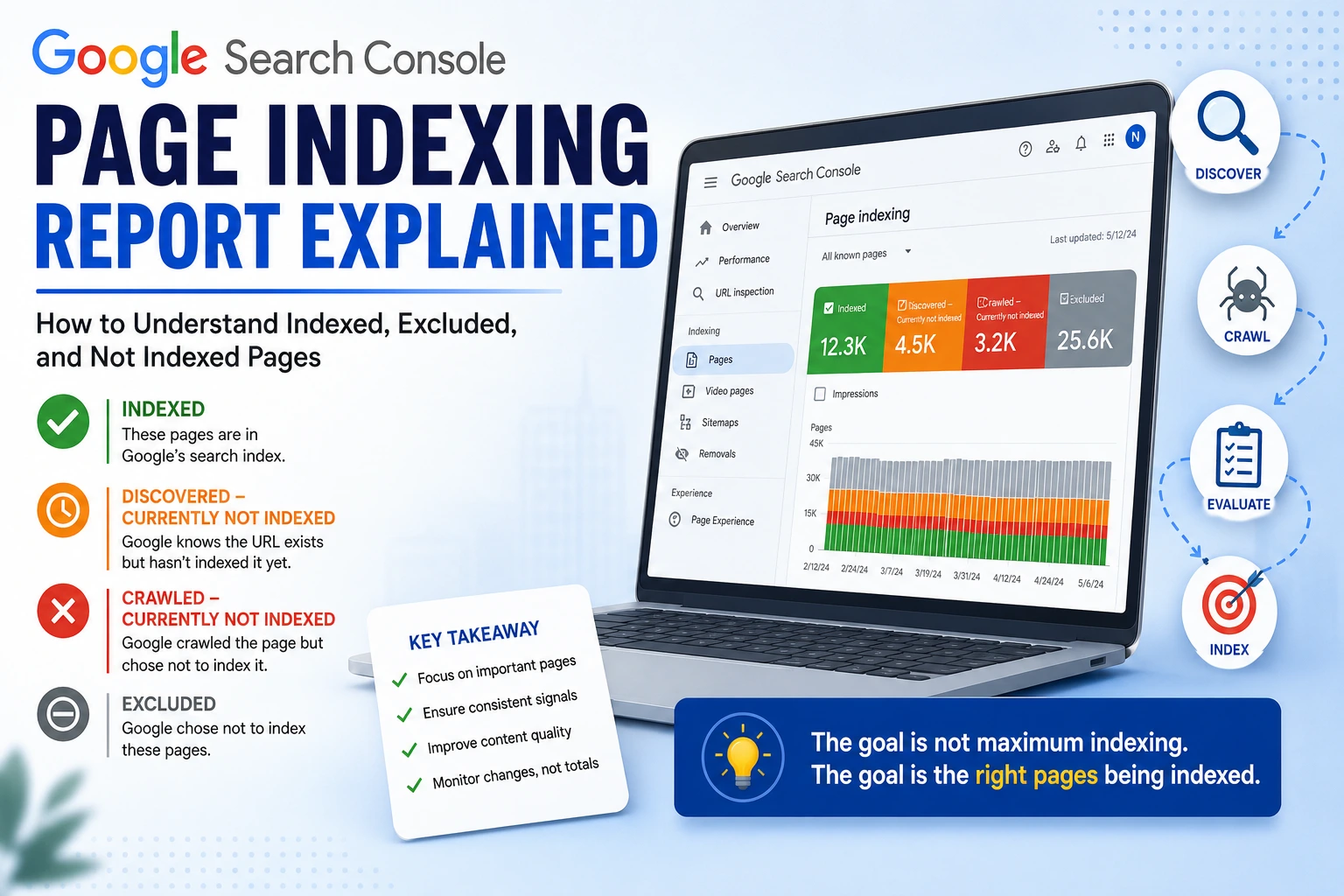
The goal is not to get every possible URL into Google’s index.
The goal is to make sure Google can discover, crawl, understand, and index the pages that provide value to users.
A healthy website can have many URLs that are intentionally not indexed.
How Google Decides Which Pages to Index
Google’s indexing process generally follows these stages:
1. Discovery
Google finds a URL through sources such as:
- Internal links
- Sitemaps
- External links
- Previously known URLs
2. Crawling
Googlebot visits the URL and downloads the page content.
3. Evaluation
Google analyses:
- Content quality
- Duplicate signals
- Technical accessibility
- User value
- Overall website signals
4. Indexing Decision
Google decides whether the page should be included in the search index.
Important:
Crawling does not guarantee indexing.
Google can crawl a page and still decide not to index it.
Why 100% Indexing Is Not the Goal
A common SEO misunderstanding is:
“A good website should have every URL indexed.”
This is incorrect.
Many websites naturally contain URLs that do not need to appear in search results.
Examples:
- Duplicate pages
- Filter URLs
- Sorting URLs
- Internal search pages
- Old product pages
- Archive pages
- Tracking URLs
For example, an ecommerce website may generate:
example.com/shoes
example.com/shoes?color=black
example.com/shoes?size=10
example.com/shoes?sort=price
These URLs may show similar products but do not necessarily need separate indexing.
Google may choose to index only the main category page.
That is usually the correct behaviour.
Understanding Google Search Console Indexing Statuses
Indexed
This means Google has selected the page to be included in its search index.
Example:
https://example.com/product/red-shoes
The page can potentially appear in Google search results.
Discovered – Currently Not Indexed
This means:
Google knows the URL exists, but it has not crawled or processed it for indexing yet.
Possible reasons include:
- The website is new
- Google has limited crawl demand
- The page has weak internal linking
- The website has a very large number of URLs
- Google is prioritising other pages
Example:
A new ecommerce website launches:
50,000 product URLs
Google may discover these URLs but crawl them gradually.
This status is not automatically a problem.
Crawled – Currently Not Indexed
This means:
Google has already visited the page but has not currently included it in the index.
Many people assume this always means:
“Google thinks the content is poor.”
While content quality is a common reason, it is not the only possibility.
Possible causes include:
1. Duplicate or Near-Duplicate Content
Example:
An ecommerce store has:
example.com/red-shirt
example.com/blue-shirt
example.com/green-shirt
If the only difference is the colour, Google may decide that indexing every variation does not provide additional value.
2. Thin or Low-Value Pages
Examples:
- Pages with very little unique information
- Automatically generated pages
- Pages created only for search engines
Google may decide these pages do not provide enough value.
3. Soft 404 Issues
A page may return:
HTTP 200 OK
but effectively behave like a missing page.
Example:
A deleted product page shows:
“Product unavailable”
with no useful information.
Google may treat it similarly to a 404.
4. Conflicting Signals
Google uses many signals when deciding whether to index a page.
Examples:
- Canonical tags
- Internal links
- Sitemap URLs
- Redirects
- Content similarity
If these signals conflict, Google may choose not to index the URL.
How to Investigate Crawled – Currently Not Indexed
Do not immediately assume:
“The content is bad.”
Check:
Content
- Is this page unique?
- Does it provide value?
- Is it better than similar pages?
Technical signals
- Does the page return the correct status code?
- Is it blocked accidentally?
- Is the canonical correct?
- Is it included properly in internal links?
Website structure
- Is the page important enough?
- Does it receive internal links?
- Is it included in the sitemap?
Are 404 Errors Bad for SEO?
Not necessarily.
A common misconception is:
“Every 404 page is an SEO problem.”
That is incorrect.
A 404 response is the correct behaviour when a page has permanently disappeared.
Example:
A product is discontinued:
example.com/product/old-item
returns:
404 Not Found
This tells Google:
“This page no longer exists.”
That is normal.
When 404s Become a Problem
The issue is not having 404 pages.
The issue is unexpected increases.
Example:
Normal:
50 404 URLs
Suddenly:
5,000 404 URLs
Possible causes:
- Website migration problems
- Broken internal links
- Incorrect URL changes
- Deleted site sections
Domain Property vs URL Prefix Property in Google Search Console
Google Search Console provides two main verification options.
URL Prefix Property
Example:
https://www.example.com
This tracks only that exact version.
It does not automatically combine:
http://example.com
https://example.com
http://www.example.com
These are treated separately.
Domain Property
Example:
example.com
A Domain Property combines data from:
- HTTP versions
- HTTPS versions
- www versions
- non-www versions
- Subdomains
Example:
www.example.com
example.com
blog.example.com
can all be viewed together.
Important: Domain Property Requires DNS Verification
Unlike URL Prefix properties, Domain Properties require verification through DNS.
Google provides a TXT record such as:
Type: TXT
Value:
google-site-verification=xxxxxxxx
You add this record inside your domain DNS provider.
Examples:
- Cloudflare DNS
- GoDaddy DNS
- Hostinger DNS
- Other domain registrars
After Google detects the TXT record, the Domain Property becomes verified.
Domain Property Does Not Redirect URLs
This is an important distinction.
Domain Property:
 Combines reporting
It does not:
 Redirect users Force HTTPS Choose your preferred URL Remove duplicate URLs
Redirects and canonical configuration must still be handled separately.
Understanding Canonical Tags
Canonical tags are often misunderstood.
Many people think:
“A canonical tag forces Google to index this URL.”
That is not correct.
A canonical tag is a signal that helps Google understand which URL you consider the preferred version among similar URLs.
Example:
You have:
example.com/product/shoes
example.com/product/shoes?color=black
You add:
<link rel=”canonical” href=”https://example.com/product/shoes”>
You are telling Google:
“The first URL is the preferred version.”
However, Google does not have to follow this recommendation.
Google evaluates multiple signals, including:
- Canonical tags
- Redirects
- Internal links
- Sitemap URLs
- Duplicate content patterns
If these signals disagree, Google may choose a different canonical URL.
How to Make Canonical Signals Stronger
For the best results, keep all signals consistent.
Example:
Preferred URL:
https://www.example.com/product/shoes
Make sure:
Canonical:
https://www.example.com/product/shoes
Sitemap:
https://www.example.com/product/shoes
Internal links:
https://www.example.com/product/shoes
Redirects:
http://example.com/product/shoes
↓
https://www.example.com/product/shoes
Consistency helps Google understand your preferred version.
Sitemap Best Practices
A sitemap tells Google:
“These are the important URLs on my website.”
A clean sitemap should contain only preferred URLs.
Good:
https://www.example.com/products/shoes
Avoid:
http://example.com/products/shoes
https://example.com/products/shoes
https://www.example.com/products/shoes
Mixed URL versions create unnecessary signals.
Ecommerce Websites and Indexing
WooCommerce and other ecommerce platforms often create many URLs.
Examples:
- Product variations
- Filters
- Sorting pages
- Category combinations
A store may have:
500 important pages
but:
50,000 generated URLs
Google does not need to index all 50,000 URLs.
The focus should be:
- Important product pages
- Useful category pages
- Valuable content pages
not every generated URL.
How to Use the Page Indexing Report Properly
Instead of checking:
“How many pages are excluded?”
Check:
1. Important Pages
Are your:
- Product pages
- Service pages
- Blog articles
- Landing pages
indexed?
2. Sudden Changes
Look for:
- Sudden increase in 404 errors
- Sudden indexing drops
- Large increases in excluded pages
3. Crawled – Currently Not Indexed
Investigate:
- Content quality
- Duplication
- Technical issues
- Conflicting signals
4. Discovered – Currently Not Indexed
Review:
- Internal linking
- Sitemap quality
- Crawl priorities
Final Thoughts
The Google Search Console Page Indexing report is not a scorecard.
A successful SEO strategy is not about forcing every URL into Google’s index.
It is about:
- Creating valuable pages
- Making important URLs discoverable
- Providing consistent technical signals
- Understanding why Google chooses to index or ignore certain URLs
The goal is not maximum indexing.
The goal is the right pages being indexed.