
Introduction
Website owners often use CDN services such as Cloudflare to improve website speed, security, and reliability.
A CDN can provide many benefits:
- Faster page loading
- Protection against malicious traffic
- Improved website availability
- Better handling of traffic spikes
However, because a CDN sits between your website server and visitors, it becomes an additional layer that controls who can access your website.
This creates an important SEO consideration:
Can a CDN accidentally prevent Google from crawling your website?
The answer is yes.
But the problem is usually not the CDN itself. The issue is normally caused by security settings that incorrectly identify Googlebot as suspicious traffic.
How Googlebot Accesses a Website With a CDN
Without a CDN, the process is simple:
Googlebot
↓
Website Server
↓
Website Content
Google requests your page directly from your hosting server.
When a CDN is active:
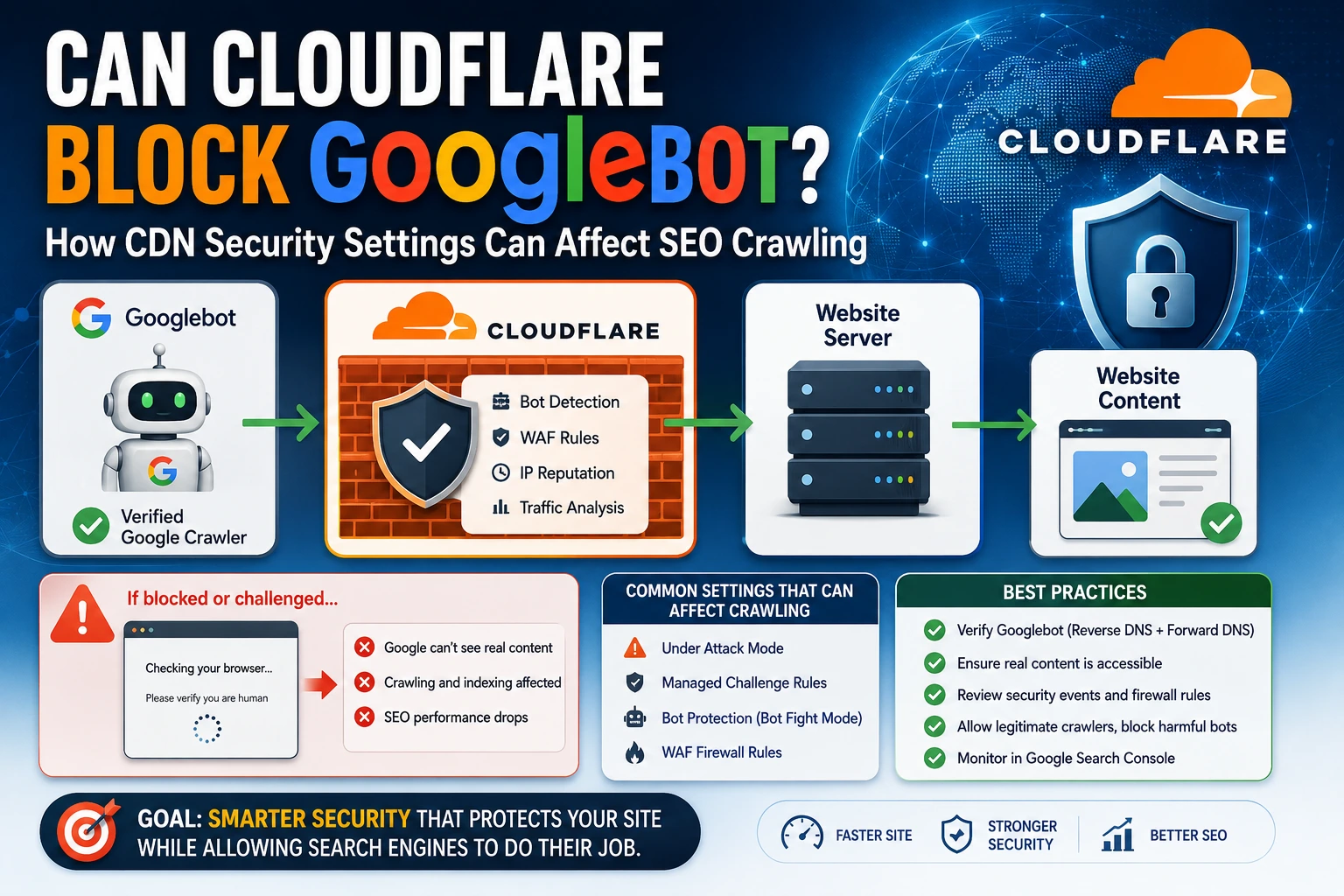
Googlebot
↓
CDN (Cloudflare)
↓
Website Server
↓
Website Content
The CDN becomes a security checkpoint.
Before allowing the request, it may analyse:
- IP reputation
- Request behaviour
- Traffic patterns
- Bot detection signals
- Firewall rules
If the CDN decides the visitor looks suspicious, it may:
- Block the request
- Limit access
- Show a verification challenge
Why Googlebot Can Accidentally Be Blocked
CDN security systems are designed to stop unwanted bots.
Examples:
- Scrapers copying website content
- Spam bots
- Malicious crawlers
- Automated attack tools
The challenge is that Googlebot is also an automated crawler.
If security rules are too aggressive, a legitimate search engine crawler can be treated like a harmful bot.
Example:
Googlebot requests:
https://example.com/product/shoes
The expected response:
Product name
Description
Price
Images
Reviews
But instead, Cloudflare returns:
Checking your browser…
Please verify you are human
Google is no longer seeing the actual page content.
The Most Dangerous Scenario: Challenge Pages Returning 200 Status Codes
One of the most important technical issues is when a CDN challenge page returns:
HTTP 200 OK
A 200 response means:
“The page loaded successfully.”
However, the actual content may be:
Checking if you are human…
Please wait…
From Google’s perspective:
The URL exists.
The server responded successfully.
But the content is not the real webpage.
This can create problems because Google may:
- Fail to understand the page
- Delay indexing
- Store incorrect content signals
- Lose confidence in the URL
Common Cloudflare Settings That Can Affect Google Crawling
Cloudflare itself does not automatically block Googlebot.
Most websites using Cloudflare work perfectly with Google Search.
Problems usually appear after enabling aggressive security features.
1. Cloudflare Under Attack Mode
Cloudflare’s Under Attack Mode is designed for websites experiencing serious security threats, such as:
- DDoS attacks
- Large amounts of suspicious traffic
- Automated abuse
When enabled, visitors may receive a browser verification challenge before accessing the website.
Example:
Visitor
↓
Cloudflare security check
↓
Website
This works well for normal visitors.
However, if Googlebot encounters the challenge instead of the actual page content, crawling can be affected.
This is one of the most common real-world situations where a legitimate website accidentally creates SEO problems.
2. Managed Challenge Rules
Cloudflare can challenge visitors based on:
- Location
- Behaviour
- IP reputation
- Suspicious activity patterns
The visitor may see:
- CAPTCHA
- Browser verification
- Human confirmation pages
These protections are useful, but important crawlers should not be blocked.
3. Bot Protection Features
Cloudflare provides bot protection features that identify automated traffic.
Examples include:
- Bot Fight Mode
- Super Bot Fight Mode
These features help block malicious bots, but incorrect configuration may create false positives.
Example:
Automated visitor detected
↓
Challenge visitor
↓
Googlebot affected
4. Web Application Firewall (WAF) Rules
Custom firewall rules can also cause problems.
Example:
A website owner creates a rule:
If visitor is a bot
→ Block
The intention:
Stop harmful bots.
The unintended result:
Googlebot may also be blocked because Googlebot is technically a bot.
How to Verify Googlebot Correctly
A common mistake is trusting this:
User-Agent: Googlebot
Anyone can send a request pretending to be Googlebot.
For example, a malicious scraper could send:
User-Agent: Googlebot
without actually being Google.
Therefore, verification should be done using Google’s recommended method.
Step 1: Reverse DNS Lookup
Take the crawler’s IP address and perform a reverse DNS lookup.
A genuine Google crawler should resolve to a hostname ending with:
googlebot.com
or
google.com
Example:
IP Address
↓
crawl-xxx.googlebot.com
Step 2: Forward DNS Verification
After finding the hostname, confirm that the hostname resolves back to the same IP address.
The process:
IP Address
↓
Reverse DNS lookup
↓
Google hostname
↓
Forward DNS lookup
↓
Same IP address
Only after both checks should you treat the request as verified Googlebot traffic.
How to Check If Cloudflare Is Affecting SEO
Method 1: Google Search Console URL Inspection
The easiest method:
Google Search Console
↓
URL Inspection
↓
Test Live URL
↓
View Tested Page
Check what Google receives.
You want:
 Actual webpage content
Not:
 Security challenge Login page Empty HTML Verification screen
Method 2: Test Important Pages
Do not check only the homepage.
Test:
Homepage
example.com
Category Pages
example.com/category/
Product Pages
example.com/product/
Blog Articles
example.com/blog/article/
If Google cannot access important pages, the entire website’s indexing can be affected.
Method 3: Review Cloudflare Security Events
In Cloudflare:
Security
↓
Events
Look for:
- Blocked requests
- Challenge actions
- Firewall rules triggered
- Suspicious Googlebot activity
How to Fix Googlebot Crawling Issues
1. Review Security Rules
Check whether Googlebot requests are:
- Blocked
- Challenged
- Rate limited
2. Avoid Whitelisting Based Only on User-Agent
Do not allow:
User-Agent: Googlebot
alone.
Because user-agent strings can be spoofed.
Use proper Googlebot verification.
3. Adjust Security Settings
Review:
- Under Attack Mode
- Bot protection settings
- WAF rules
- Managed challenges
The goal is not removing security.
The goal is allowing legitimate crawlers while blocking harmful traffic.
CDN SEO Checklist
Before and after enabling CDN security features, check:
Googlebot can access important pages Pages return correct HTTP status codes No verification page is served to crawlers Google Search Console shows real content Firewall rules are reviewed Sitemap URLs are accessible Canonical URLs resolve correctly
Final Thoughts
Using Cloudflare or another CDN is not an SEO problem.
A correctly configured CDN can improve website performance and security.
The problem happens when the security layer creates a difference between:
What users see
and:
What Googlebot sees
A healthy technical SEO setup ensures:
Users
↓
Fast and secure website
Googlebot
↓
Accessible and crawlable content
The goal is not weaker security.
The goal is smarter security that protects the website while allowing search engines to properly understand and index your content.